
Step 1: Preparing your GitHub repository
No specific code required here. Just ensure your WordPress theme and any necessary build scripts are in your GitHub repository.
Step 2: Setting up the workflow
Create a new file under .github/workflows/deploy-release.yml in your GitHub repository with the following basic structure:
name: Deploy release

on:
  push:
    tags:
      - '[0-9]+.[0-9]+.[0-9]+'
  workflow_dispatch:
This code snippet sets up the workflow to trigger on tag pushes that match semantic versioning and allows manual dispatch (with workflow_dispatch property).
Step 3: Configuring jobs
jobs:
  build:
    runs-on: ubuntu-latest
    permissions:
      contents: write
    env:
      THEME_NAME: 'your-theme-name'
    steps:
    - uses: actions/checkout@v3
    - uses: actions/setup-node@v3
      with:
        node-version: 18
    - name: Compile CSS and Javascript
      run: |
        cd wp-content/themes/${THEME_NAME}
        npm ci --ignore-scripts
        npm run prod --chore=ci
This configures the job environment, checks out your code, sets up Node.js, and compiles your theme.
- You can change the
THEME_NAMEvariable to whatever you want, it’ll be the name of the zip & folder your theme is stored. - You can run as many scripts as you want as long as the dependencies are installed first (the scripts here are examples)
- Here, we go to the theme directory and we set up Node.js then compile the theme
Step 4: Packaging the theme
    - name: Zip release
      uses: thedoctor0/zip-release@0.7.1
      with:
        type: 'zip'
        directory: 'wp-content/themes/${{ env.THEME_NAME }}'
        filename: 'theme-${{ env.THEME_NAME }}.zip'
        path: 'LICENSE readme.txt screenshot.jpg functions.php style.css theme.json styles/ templates/*.html parts/*.html patterns/*.php blocks/react/build lang/ inc/ build/ acf-json/'
        exclusions: ''
This step packages your theme into a zip file, ready for release.
- You can change the included files where the
pathproperty is. - You can add exluded files where the
exclusionsproperty is. - For more property you can go see the repository
Step 5: Publishing the release
    - name: Publish release
      uses: ncipollo/release-action@v1
      with:
        artifacts: 'wp-content/themes/${{ env.THEME_NAME }}/theme-${{ env.THEME_NAME }}.zip'
This step creates a GitHub release and attaches the zipped theme package.
Complete workflow file
Combining all the steps above, your deploy-release.yml should look like this:
name: Deploy release

on:
  push:
    tags:
      - '[0-9]+.[0-9]+.[0-9]+'
  workflow_dispatch:

jobs:
  build:
    runs-on: ubuntu-latest
    permissions:
      contents: write
    env:
      THEME_NAME: 'your-theme-name'
    steps:
    - uses: actions/checkout@v3
    - uses: actions/setup-node@v3
      with:
        node-version: 18

    # Compile the theme if you need it
    - name: Compile CSS and Javascript
      run: |
        cd wp-content/themes/${THEME_NAME}
        npm ci --ignore-scripts
        npm run prod --chore=ci

    # Zip the theme inside a clean release with only necessary files
    # see https://github.com/TheDoctor0/zip-release
    - name: Zip release
      uses: thedoctor0/zip-release@0.7.1
      with:
        type: 'zip'
        directory: 'wp-content/themes/${{ env.THEME_NAME }}'
        filename: 'theme-${{ env.THEME_NAME }}.zip'
        path: 'LICENSE readme.txt screenshot.jpg functions.php style.css theme.json styles/ templates/*.html parts/*.html patterns/*.php blocks/react/build lang/ inc/ build/ acf-json/'
        exclusions: ''

    # Publish the release online
    # see https://github.com/ncipollo/release-action
    - name: Publish release
      uses: ncipollo/release-action@v1
      with:
        artifacts: 'wp-content/themes/${{ env.THEME_NAME }}/theme-${{ env.THEME_NAME }}.zip'
This file defines a complete GitHub Actions workflow for automating the build, packaging, and release of your WordPress theme on GitHub, triggered by semantic versioning tags.
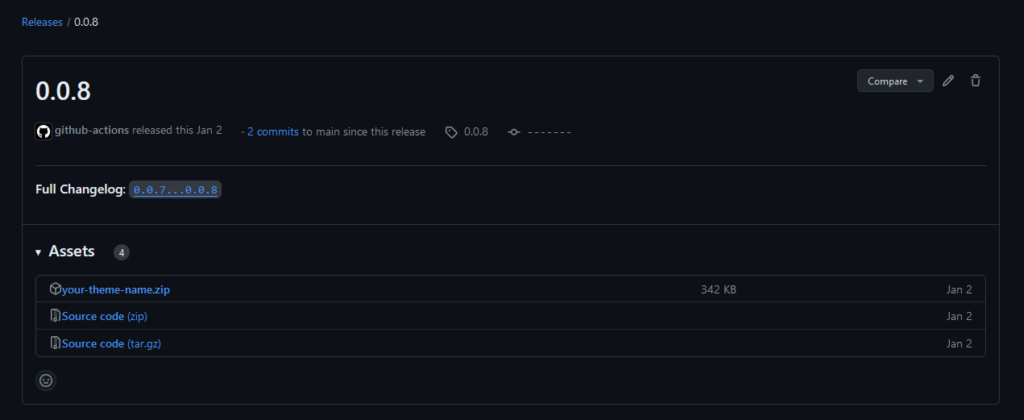
As an example, if you push the tag named “0.0.8” on github, It will start the process and create a release like so :
Additional information
Package used for this script :
Leave a Reply